Abstract
Modern automotive infotainment systems integrate multimedia streaming, hands-free communication, smartphone connectivity, messaging, and contact management, resulting in increasingly complex software architectures. Traditional validation approaches that rely solely on physical hardware introduce challenges related to hardware availability, integration timelines, testing scalability, and reproducibility of edge-case scenarios. This application note presents Tata Elxsi's Level-4 Virtual ECU (vECU) based infotainment validation platform that enables early software development, integration, and Software-in-the-Loop (SiL) testing. The platform supports comprehensive validation of Bluetooth-enabled infotainment functionalities, including media streaming, telephony, messaging, and contact synchronization, while significantly reducing dependence on physical prototypes.
Introduction
Modern vehicles increasingly depend on advanced infotainment systems that deliver multimedia, connectivity, and communication services. These systems are built on high-performance System-on-Chip (SoC) platforms and must simultaneously satisfy user experience expectations, real-time performance requirements, security considerations, and resource constraints.
As infotainment software becomes more sophisticated, validation exclusively on target hardware becomes costly and time-consuming.
Challenges include:
- Limited hardware availability during development
- Long integration cycles
- Difficulty reproducing corner-case scenarios
- Increased validation costs
- Delayed software feedback cycles
To address these challenges, Tata Elxsi has developed a virtualization-based validation approach using a Level-4 Virtual ECU (vECU). This approach enables hardware-independent software development and testing, supporting early validation and parallel development of software and hardware components.
Solution Overview
The proposed solution is a Level-4 vECU platform designed for end-to-end validation of automotive infotainment software with a primary focus on Bluetooth functionality. The same platform can be scaled to cover all infotainment functionalities. The platform provides a realistic virtual representation of an infotainment ECU capable of executing production-target binaries within a simulated hardware environment.
The solution supports validation of:
- Bluetooth device discovery
- Device pairing
- Connection management
- Audio streaming
- Media control
- Hands-free calling
- Contact synchronization
- Message access and notifications
Product Highlights
Key Capabilities
- Level-4 Virtual ECU-based infotainment validation platform
- Execution of target software binaries within a virtual environment
- Real Bluetooth interaction using USB passthrough
- Support for multimedia, telephony, messaging, and contact management
- Software-in-the-Loop (SiL) testing
- Parallel development and validation workflows
- Scalable and repeatable testing environment
- Reduced dependency on physical ECUs and test benches
Architecture of the Virtualized Infotainment Platform
The infotainment software follows a layered architecture that separates user-facing applications from underlying platform components.
Functional Block Diagram
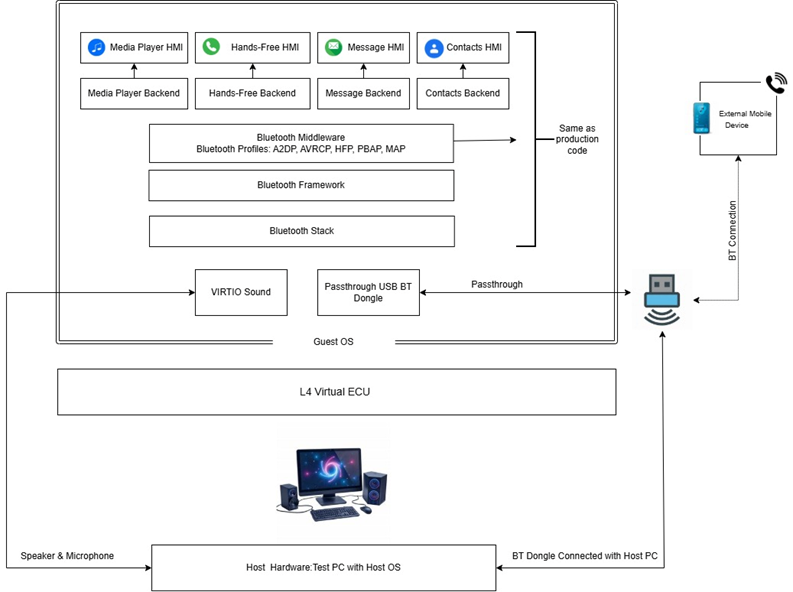 Figure 1. Architecture of Infotainment Virtualization Setup
Application Layer
The application layer hosts infotainment services including:
- Media Player
- Hands-Free Services
- Messaging HMI
- Contact Management HMI
- Backend application services
Middleware and Connectivity Stack
The middleware layer provides:
- Inter-process communication
- Service discovery
- System coordination
- Bluetooth profile management
Bluetooth Stack
The Bluetooth stack executes inside the guest operating system and supports:
- Audio streaming
- Telephony services
- Contact synchronization
- Message synchronization and notifications
Virtual ECU Environment
The Virtual ECU runs on a standard development platform and utilizes:
- Virtual Machine-based execution of target software binaries
- VIRTIO interfaces for efficient resource access
- USB Bluetooth passthrough
- Native ECU-like device representation
This architecture enables realistic infotainment validation while preserving the flexibility and scalability advantages of virtualization.
Bluetooth Profile Validation
The platform validates multiple Bluetooth profiles through interaction with real mobile devices.
|
Bluetooth Profile
|
Validation Focus
|
|
A2DP
|
Audio streaming and playback behavior
|
|
AVRCP
|
Media control and metadata exchange
|
|
HFP
|
Hands-free call setup and audio routing
|
|
PBAP
|
Contact access and synchronization
|
|
MAP
|
Message access and notification handling
|
Table 1. Bluetooth Profile Validation Coverage
Tools and Hardware Requirements
Host Environment
- Ubuntu Linux Host OS
- x86-based development platform
- QEMU Virtualization Platform
- USB Bluetooth Dongle
- Speakers
- Microphone
- USB interfaces
Guest Environment
- ARM-based Guest OS
- Ubuntu Linux Guest OS
- Complete infotainment software stack
- BlueZ Bluetooth Stack
- PulseAudio for audio routing
Development Frameworks
- Qt/QML-based infotainment application
- QEMU virtualization environment
- BlueZ Bluetooth framework
- PulseAudio audio subsystem
Getting Started
The virtual infotainment validation platform can be deployed using the following workflow:
- Configure host Ubuntu environment.
- Launch the QEMU virtual machine.
- Boot the ARM-based guest operating system.
- Initialize the infotainment application.
- Enable Bluetooth services through BlueZ.
- Connect the USB Bluetooth device using passthrough.
- Start device discovery.
- Pair with a mobile device.
- Begin infotainment feature validation.
Using the Application
Device Discovery and Pairing
Upon startup, the infotainment application automatically loads necessary backend services and initializes Bluetooth functionality. The system discovers nearby Bluetooth-enabled devices and displays them to the user for pairing and connection establishment.
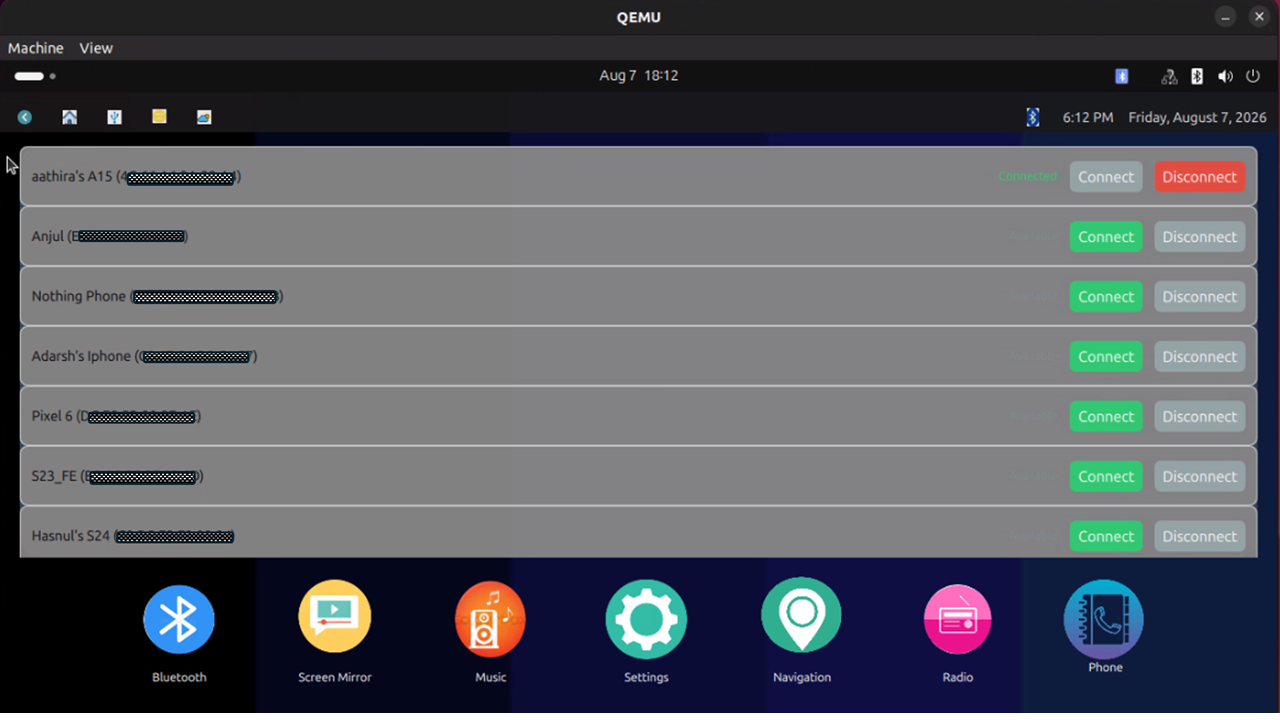 |
Figure (a): Device Discovery Interface
|
Media Playback and Streaming
After successful pairing:
- A2DP enables audio streaming.
- AVRCP provides playback controls.
- Track metadata is retrieved dynamically.
- Album information, artist details, and playback status are displayed within the infotainment interface.
Supported controls include:
- Play
- Pause
- Next Track
- Previous Track
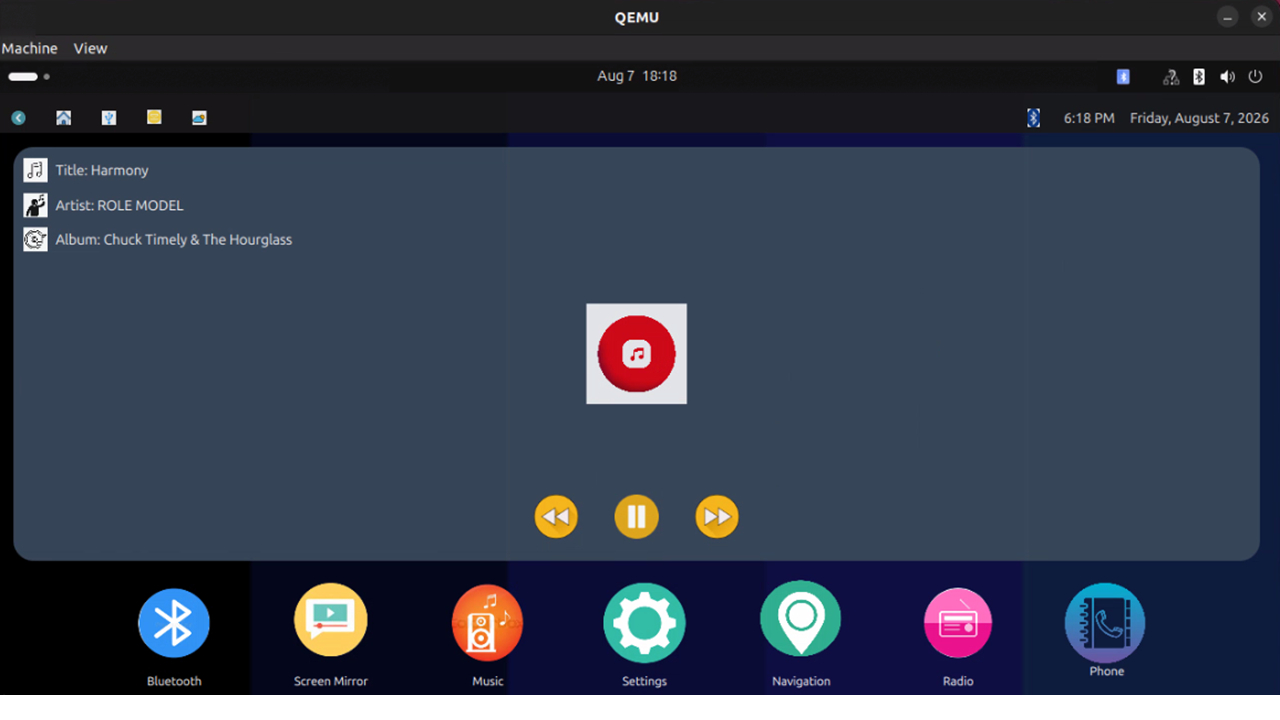 Figure (b): Media Playback Interface
Hands-Free Calling
The system supports Bluetooth-based telephony through the Hands-Free Profile (HFP).
Capabilities include:
- Incoming call notifications
- Call acceptance
- Call rejection
- Voice communication via vehicle audio system
- Audio routing through PulseAudio
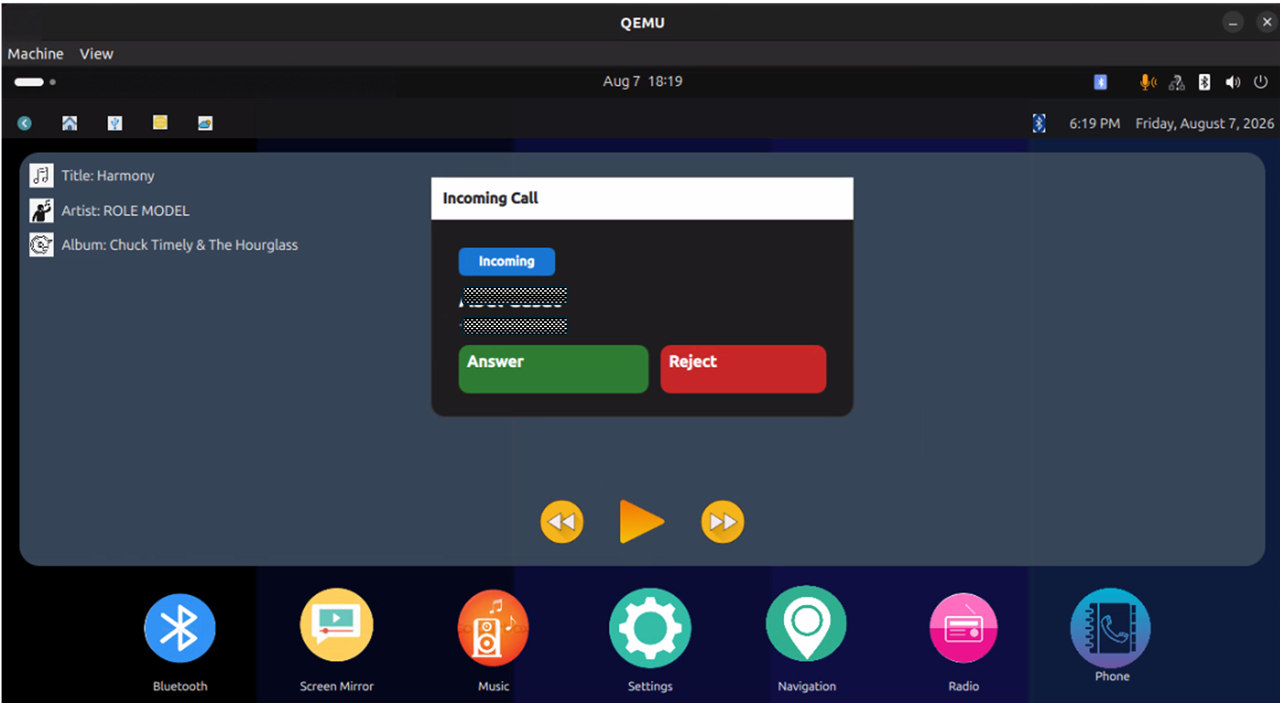 Figure (c): Hands-Free Calling Screen
Messaging Support
Using the Message Access Profile (MAP), users can:
- Receive message notifications
- View previously received SMS messages
- Access message details
- Synchronize messaging information from connected devices
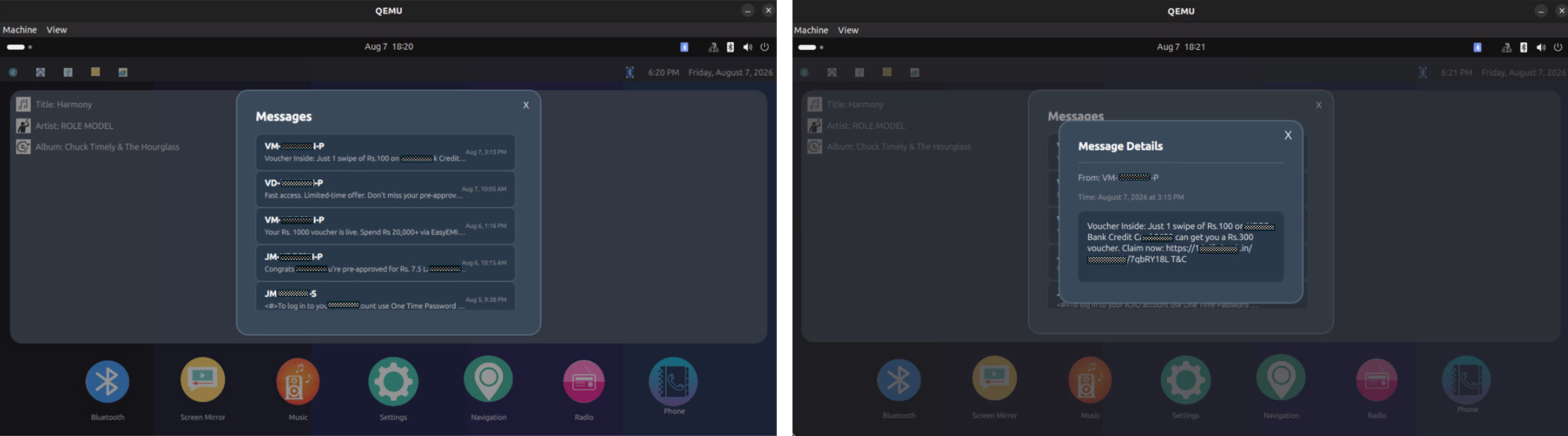 Figure (d) and (e): Messaging Interfaces
Contact and Call History Management
Using the Phone Book Access Profile (PBAP), the system provides:
- Contact synchronization
- Caller identification
- Access to recent call history
- Direct dialing functionality
- One-touch calling from contact lists
Available Screens
- Contact List View
- Recent Calls View
- Dial Pad Interface
- Call Initiation Screen
 Figure (f), (g) and (h): Contact and Dialling Interfaces
Application Functionality Example
A typical validation scenario includes:
- Launch virtual infotainment ECU.
- Discover nearby smartphone.
- Establish Bluetooth pairing.
- Start audio streaming through A2DP.
- Control playback using AVRCP commands.
- Receive an incoming phone call through HFP.
- Automatically pause media playback.
- Accept the call through infotainment HMI.
- Resume media playback after call completion.
- Synchronize contacts and messages using PBAP and MAP services.
This demonstrates coordinated operation across multiple infotainment services within the virtual ECU environment.
Performance and Validation Benefits
The virtualization platform delivers several development and validation advantages.
Development Efficiency
- Early software validation
- Faster defect identification
- Reduced integration delays
- Improved developer productivity
Cost Optimization
- Reduced dependence on hardware prototypes
- Lower test infrastructure costs
- Shared virtual environments across teams
Scalability
- Parallel usage by multiple developers and testers
- Repeatable and consistent validation workflows
- Flexible deployment across development environments
- Can be scaled to cover all infotainment functions
Quality Improvement
- Shift-left testing methodology
- Increased testing coverage
- Early issue detection
- Improved software robustness before hardware availability
Conclusion
Tata Elxsi's Level-4 Virtual ECU-based infotainment validation platform enables comprehensive virtual validation of Bluetooth-enabled infotainment systems while minimizing dependence on physical hardware. By providing a realistic execution environment for production software, the platform supports early feature validation, faster software integration, improved scalability, and cost-effective testing. The solution enables automotive OEMs and Tier-1 suppliers to accelerate development cycles, improve software quality, and achieve faster time-to-market through virtualization-driven validation workflows.
Author
Practice Head, Virtualization
Tata Elxsi
Senior Specialist
Tata Elxsi
Senior Engineer
Tata Elxsi